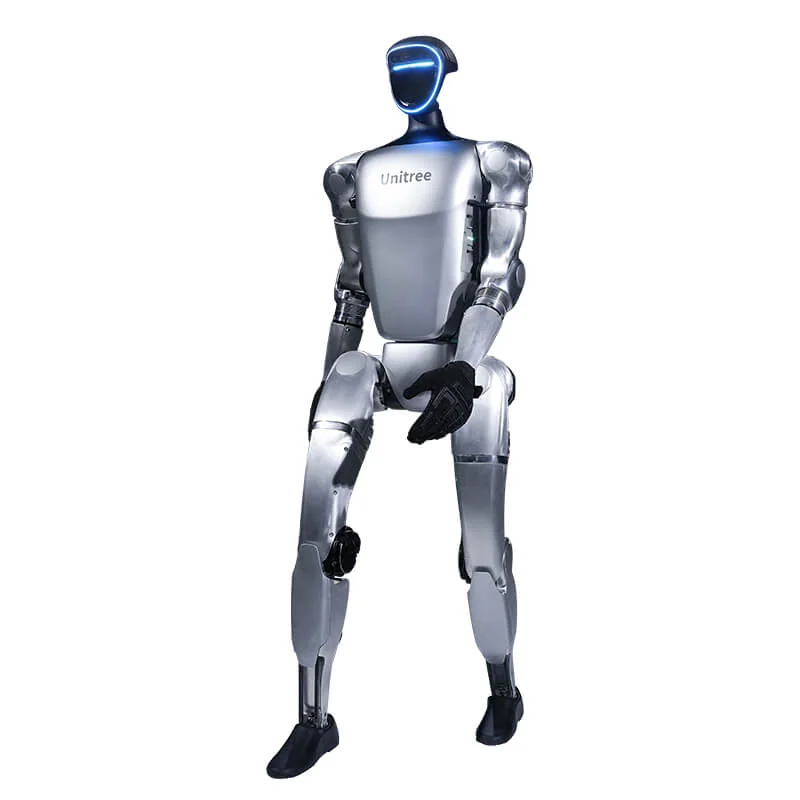
The question "what can the Unitree G1 do" usually comes from videos of dances, jumps and getting up. Those videos show successful sequences, not what it takes to use the robot in a lab or a company. The G1 is a humanoid 1.32 m tall and about 35 kg that, once on its feet, walks, sits, gets up and runs demos. Going further requires an EDU version, development time and a task written in a verifiable way.
Unitree G1: what it can do after startup
The basics are shared: 6 degrees of freedom per leg, a single-axis waist and a 9000 mAh battery. The G1 Air has 23 degrees of freedom; the EDU ranges from 23 to 43. What changes most is what you can command and program. After startup and the standing-up sequence, the ready-to-use functions are these:
- Walking and running: Running mode with R2 + A; Regular mode with R1 + X (single-axis waist) or R1 + Y (3-axis waist); low and high speed.
- Postures: locked standing, sitting, squat and return to standing.
- Getting up from the floor: L2 + X takes the robot from lying down to standing.
- Gestures: handshake, wave, applause, kiss, arms raised.
- Demos: dances, kung fu and the getting-up sequence start from the R3 remote.
- Unitree Explore app: status, temperatures, alarms, motor and IMU calibration, joint tuning and a teaching function to record upper body actions and replay them.
The startup sequence, remote commands and network are covered in the G1 operating guide.
Walking, getting up and fall recovery: what they mean in practice
Walking in Regular mode does not mean navigating on its own. The robot keeps its balance and responds to commands, but it does not know the environment. Unitree states that the current walking mode does not include stairs: steps and changes in level are not a ready task.
Getting up from the floor is a sequence. L2 + X takes the robot from lying down to standing; the Roll Up demo does the same within a choreography. It is not a guaranteed recovery from any fall. If the robot falls on its side, against an obstacle or with an arm in an unusual position, the command may not be enough. Unitree documentation limits startup from lying down or from a squat to flat, hard floors.
For a biped, falling is a normal event during development. The difference between a demo and a test is that in a test you record how many times the robot falls, how long it stays on the ground and who intervenes. That is why the first tests are done with free space and a person on the remote.
What SDK2 and ROS 2 add (EDU versions only)
The Unitree datasheet lists custom software development only in the G1 EDU column. The G1 Air has no PC2, the development computer that runs user programs. On the G1 EDU the PC2 is a Jetson Orin NX with 16 GB of RAM and 2 TB of storage, reachable at 192.168.123.164.
With SDK2, in C++ and Python, you publish commands over DDS, read motor, IMU and battery status and control the hands. ROS 2 is added with unitree_ros2 when you need ROS 2 topics, rosbags or nodes already written for ROS 2. The step-by-step path is in the guide to G1 programming.
At list price the G1 Air costs €19,809, the G1 EDU Standard (U1) €38,005 and the G1 EDU Plus (U2) €46,809, excluding VAT. The G1 family reaches €90,829 for the G1 EDU Ultimate I.
Teleoperation and data collection
With a G1 EDU and an XR headset you can teleoperate the robot. The official xr_teleoperate repository supports the G1 at 23 and 29 DoF, the Dex3-1, Inspire and BrainCo hands, and records episodes with one button. Data is converted to the LeRobot format with unitree_lerobot, which also includes training and testing on the real robot.
It is used to collect human demonstrations to train a manipulation policy, not to control the robot in production. It requires a trained operator, a headset, space and time. Data quality depends on how you record, not only on the number of episodes.
RL and sim-to-real
On a G1 EDU, unitree_rl_gym covers the Train, Play, Sim2Sim and Sim2Real cycle for the G1. You train a policy in Isaac Gym, verify it in MuJoCo and then take it to the real robot in debug mode. unitree_mujoco and unitree_sim_isaaclab expose the same DDS interfaces as the robot.
It is the typical path of a lab: start from simulation, measure the sim-to-real gap and accept that the policy must be retested after every firmware update. It is not a "train and go" button.
The real limits: manipulation and battery life
The maximum payload per arm is about 3 kg on the EDU and about 2 kg on the base G1. Unitree states that the value varies greatly with posture and arm extension. Hands are optional; the versions that include them cost more. A tactile sensor makes sense if the task requires measuring contact.
The stated battery life is about 2 hours with the 9000 mAh battery. With continuous walking, teleoperation and loads on the arms, a day of testing is organised with at least two batteries. Recharging and swapping take time and a person.
A G1 does not replace a cobot in a high-cycle pick and place cell. For a bench task, the G1-D Standard is on a fixed stand, without legs. For repetitive logistics, an AMR or a cobot remains simpler to integrate.
Demo videos and repeatable tasks: how to tell them apart
A video shows the best of a sequence, often after many attempts and with an operator out of frame. A repeatable task requires the same action to succeed several times, with varying objects and positions. The table separates the two.
| What you see in the video | What it takes to repeat it | Where it breaks |
|---|---|---|
| Dance, kung fu, gestures | Preinstalled demos from the remote | Obstacles, uneven floor, limited space |
| Getting up from the floor | L2 + X command or Roll Up demo | Falling on its side, soft surface, insufficient space |
| Handshake | Interactive gesture from the remote | Person moving, wrong height, sudden contact |
| Pick and place | Hands, SDK, perception and data | Deformable objects, grips out of position, cycle times |
| Teleoperation | Headset, PC2 and operator | Latency, calibration, fatigue |
| RL policy | Simulation, deployment and debug mode | Sim-to-real gap, firmware, safety |
These are not tests run by Abra Robotics: before signing, ask which row you want to demonstrate and with which numbers.
Which G1 to choose for your case
- Demos, trade fairs, showrooms: G1 Air. It walks and runs the demos, it is not programmable.
- Locomotion, RL, sim-to-real: G1 EDU Standard (U1), 23 DoF and PC2.
- Teleoperation and manipulation with the arms: G1 EDU Plus (U2), 29 DoF, articulated waist and wrists.
- Bench manipulation: G1-D Standard, on a fixed stand.
Before choosing, write down the task and the KPIs. The guide to setting up a PoC with a humanoid robot in a company explains which numbers to fix before testing.
What Abra Robotics does
Abra Robotics supplies the Unitree range, cobots and AMRs, including to customers in the United Kingdom, Ireland and international markets, with support in English. For the G1 we help you choose the version and, as a separate service, we offer training and custom software development on the Unitree SDK. For assistance and spare parts, Abra Robotics is the first point of contact.
Frequently asked questions
What can the Unitree G1 do without programming?
It walks, sits, gets up from the floor and performs gestures and demo sequences from the R3 remote. The Unitree Explore app handles status, calibration and joint tuning.
Can the G1 get up on its own after a fall?
It has a command from lying down to standing and a getting-up demo sequence, but it is not a guaranteed recovery from any fall. It works on flat, hard floors, with free space.
What is the difference between the G1 Air and the G1 EDU?
The G1 Air walks and runs the demos, but it has no development computer and is not programmable. SDK2, ROS 2, teleoperation and data collection require an EDU version.
How long does the G1 battery last?
About 2 hours with the 9000 mAh battery, according to Unitree. Continuous walking and loads on the arms reduce real battery life.
Is the G1 ready for a repetitive task in a company?
Not as a production robot. Manipulation is light (about 3 kg per arm on the EDU) and every task has to be developed, measured and safeguarded. A PoC with written KPIs is the better first step.
Sources
- Unitree, G1 and G1 EDU datasheet (degrees of freedom, payload per arm, battery, custom software development).
- Unitree Document Center, G1 remote control (walking modes, getting up from the floor, gestures, stair limit and flat floor).
- Unitree, G1 remote control quick reference (modes, gestures and Roll Up demo).
- Unitree Document Center, G1 developer FAQ (PC2: Jetson Orin NX 16 GB, 2 TB and address 192.168.123.164).
- Unitree Document Center, Arm Action Service Interface (taught actions recorded with the app's teaching function).
- Unitree, Unitree Explore App for G1 (status, calibration, joint tuning, videos and manuals).
- Unitree Robotics, xr_teleoperate (G1 23 and 29 DoF teleoperation, data recording).
- Unitree Robotics, unitree_lerobot (data conversion, training and testing on the G1).
- Unitree Robotics, unitree_rl_gym (Train, Play, Sim2Sim, Sim2Real for the G1).
- Unitree Robotics, unitree_mujoco and unitree_sim_isaaclab (simulation with the same DDS interfaces as the robot).
- Unitree Robotics, unitree_ros2 (ROS 2 interfaces for Unitree robots).